
Audit your plugins without leaving wp-admin.
Ultimate Auditor connects your WordPress site to Plugin Auditor and scores every installed plugin across six categories, with issues pinned to the exact file and line. Free, and it runs right inside your dashboard.
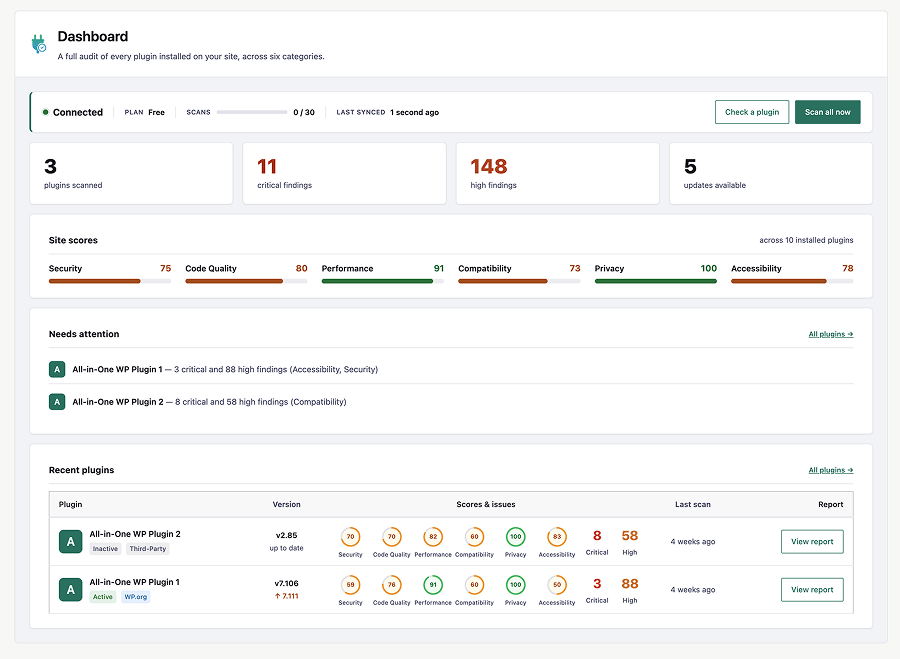
Everything you need, inside wp-admin.
Scan what you already run and see exactly where each plugin stands, without uploading anything by hand.
Scan from wp-admin
One-click scans from your Plugins page, one plugin or all of them at once.
Scores in your plugins list
Each plugin's score, category rings, and issue counts, right where you manage them.
A dashboard for your site
Site-wide scores and the plugins that need attention, at a glance.
Covers every plugin
WordPress.org, premium, and custom plugins alike, with real icons, versions, and update status.
Maintenance insights
Flags outdated versions and abandoned or unmaintained plugins in what you run.
File and line-level reports
Findings pinned to the exact file and line, with full reports on pluginauditor.com.
Up and running in five steps.
Install, connect your free account, and start scanning. It takes a couple of minutes.
Install from WordPress.org
Add Ultimate Auditor from your Plugins screen or download it from WordPress.org.
Create a free account
Sign up for a free Plugin Auditor account, 30 scans a day, no card required.
Copy your API key
Find your API key in Account Settings on app.pluginauditor.com.
Paste it into Settings
Add the key on Ultimate Auditor's Settings page to connect your site.
Scan from your Plugins page
Scan one plugin, or bulk-scan them all, and read the results in your dashboard.
Questions, answered.
Yes. A free Plugin Auditor account includes 30 scans per day, with full audit reports and shareable report links.
For WordPress.org plugins, only the slug and version are sent. Premium or custom plugins are uploaded as a ZIP for analysis and deleted afterwards.
No. Ultimate Auditor performs automated code and standards analysis against best practices. It does not detect known CVEs or live exploits.
Your API key is stored in the standard WordPress options table and is never exposed on the front end.
Open Ultimate Auditor's Settings and click Disconnect to stop all communication with the service.